
Lotus365.in login is a common search term used by people trying to access the Lotus365 platform. This guide explains the usual login process, how to reset a forgotten password, and how to check that you are on the real site before entering any account details.
Important: This article cannot independently confirm that lotus365.in is the official Lotus365 domain. Always verify the web address through official Lotus365 support or verified communication channels before logging in or depositing money.
Table of Contents
Introduction
Lotus365 is commonly searched by users looking for an online gaming or betting platform. Like many similar platforms, it may have multiple web addresses, mirror links, and unofficial copies, which can make it difficult for new users to find the correct login page.
The biggest risk is not forgetting a password—it is entering your details on a fake website. Scammers often create lookalike domains to collect passwords, OTPs, and payment information. This guide provides a simple, safety-first approach to www lotus 365 in login, password resets, and common login problems.
What Is Lotus365.in?
Lotus365.in is a domain name that people search when trying to access the Lotus365 platform. Users may search for it to log in, create an account, reset a password, or find a working mirror link.
However, a domain appearing in search results does not automatically prove it is official. At the time of writing, this guide cannot confirm that lotus365.in is the verified official Lotus365 site. Before using it, check the exact spelling, look for secure HTTPS, and confirm the address through official Lotus365 support.
Think of it this way:
- Lotus365 is the platform or brand name.
- Lotus365.in is one possible domain people search for.
- Login is the process of accessing an existing account.
- Mirror links are alternate addresses that may or may not be official.
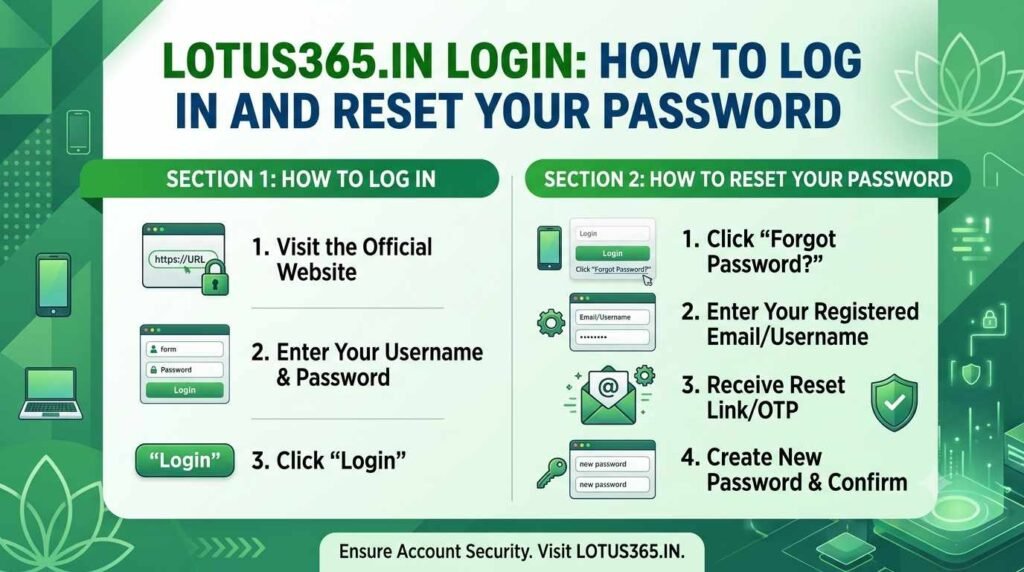
How to Log In to Lotus365 Step by Step
If you already have a Lotus365 account, follow these steps carefully.
- Open the verified Lotus365 website. Type the address manually or use a link from an official, verified source. Avoid random WhatsApp, Telegram, or social-media links.
- Find the Login button. It is usually shown at the top-right corner of the homepage or in the main menu.
- Enter your registered mobile number or username. Use the same detail you used when creating your account.
- Enter your password carefully. Check for typing errors, especially if your password includes numbers, symbols, or capital letters.
- Complete any security step. Some platforms may ask for an OTP or verification code. Enter it only on the official login page.
- Click Login. If your details are correct, you should be taken to your account dashboard.
- Do not save your password on a shared device. If you are using a public computer, log out after use and clear the browser history.
For a more detailed walkthrough, see the platform’s Lotus365 Login page and Lotus365 Login Guide.
Forgot Your Lotus365 Password?
If you cannot remember your password, use the platform’s Forgot Password option. The usual reset process is:
- Open the login page. Click Forgot Password or Reset Password.
- Enter your registered mobile number. Make sure it is the same number linked to your Lotus365 account.
- Request the OTP. A one-time password may be sent by SMS or through another verification method.
- Enter the OTP. Do not share this code with anyone, including someone claiming to be customer support.
- Create a new password. Use a strong password with a mix of letters, numbers, and symbols.
- Confirm the new password. Re-enter it exactly the same way.
- Log in again. Use your registered mobile number or username and the new password.
If you do not receive the OTP, check your mobile network, wait a few minutes, and make sure you entered the correct number. Never ask another person to receive or share an OTP for you.
Lotus365.in Login Password Problems
Many login issues are caused by small mistakes. Check these common problems before contacting support.
Wrong Password
Make sure you are entering the current password, not an old one. If you recently reset it, use the new password.
Caps Lock Is On
Passwords are case-sensitive. Check whether Caps Lock is enabled, especially if your password contains capital letters.
Saved Old Password
Your browser may automatically fill in an outdated password. Delete the saved password, type it manually, and update it only after logging in successfully.
Too Many Attempts
Some platforms temporarily lock an account after several failed login attempts. Wait for the suggested time, then try again or use the password-reset option.
Incorrect Mobile Number
Make sure you are using the mobile number or username registered with Lotus365. A different number will not receive the OTP.
Poor Internet Connection
A weak connection can prevent the login page or OTP system from working properly. Switch to a stable Wi-Fi or mobile-data connection and try again.
Check You Are on the Real Site Before Logging In
Before entering your password, complete this quick safety check.
- Check the spelling. Look carefully at every letter in the domain. Fake sites often use names such as lotus365-login.net, lotusy365.in, or lotus365in-login.com.
- Look for HTTPS. The address should begin with https:// and display a padlock icon. HTTPS protects the connection, but it does not by itself prove a site is genuine.
- Use official links only. Access the site through a verified official source, not through unknown WhatsApp groups, Telegram channels, or social-media comments.
- Never share OTPs. Lotus365 support should never ask for your OTP, password, UPI PIN, or CVV.
- Avoid unofficial payment requests. Do not send money to a personal UPI ID or bank account shared by an unknown agent.
- Check support before depositing. Ask a basic question through official support and see whether the response matches the information on the site.
Login Still Not Working?
If you have checked your password and internet connection but still cannot log in, try these steps.
- Reset your password. Use the Forgot Password option and create a new password.
- Clear browser cache and cookies. Old saved data can sometimes interfere with login.
- Try another browser or device. This helps identify whether the issue is related to your browser.
- Disable VPN or proxy temporarily. Some platforms restrict access from certain networks or regions.
- Contact official Lotus365 support. Use the contact details listed on the verified official site. Do not trust support numbers shared by unknown people.
Frequently Asked Questions
How do I log in to lotus365.in?
Open the verified Lotus365 website, click Login, enter your registered mobile number or username, type your password, complete any OTP verification if asked, and click Login.
How do I reset my Lotus365 password?
Click Forgot Password on the login page, enter your registered mobile number, request and enter the OTP, create a new password, confirm it, and log in again.
Is lotus365.in the official site?
This guide cannot independently confirm that lotus365.in is the official Lotus365 domain. Always verify the address through official Lotus365 support or verified communication channels before logging in.
Why am I not receiving my Lotus365 OTP?
Check that you entered the correct registered mobile number, ensure your network signal is stable, wait a few minutes, and request the OTP again. If it still does not arrive, contact official support.
What should I do if I entered my password on a fake site?
Change your Lotus365 password immediately, contact official support, and contact your bank or UPI provider if you shared payment details or sent money.

Rahul Mehta is a gaming industry writer and betting platform specialist with over 7 years of experience covering online cricket betting, casino games, sports markets, and gaming technology. As a content contributor for Official Lotus365, he creates accurate, user-focused guides on account registration, login, payments, app updates, promotions, and responsible gaming. His goal is to help users enjoy a secure, informed, and seamless betting experience with trusted, up-to-date information.